Order Flow & Liquidations Guide
Depth, participation and liquidation context
Add available order-flow context — depth, delta/CVD, volume profile, footprint and liquidations where supported — to price analysis. Coverage and history limits vary by instrument. Liquidations are not the same as Stratum public positions.
Open Live Tool →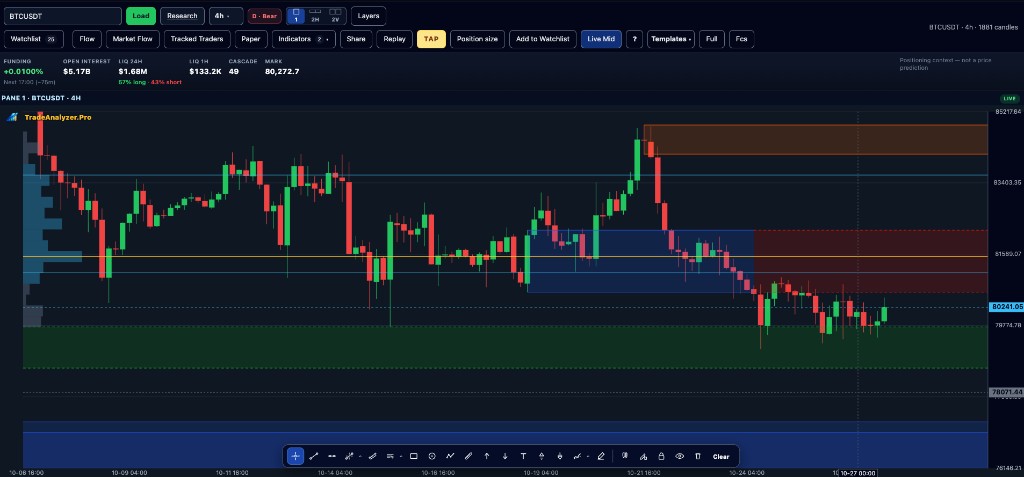
Key points
- Not every instrument supports every order-flow view
- Liquidations ≠ order-book heatmaps ≠ Stratum positions
- Some views use aggregated or history-lite series
- Always pair with Chart structure
- Use as confirmation/context around a primary technical plan
Why this matters
Order-flow and liquidation context can explain aggressive moves or squeeze risk. Without chart structure first, the extra data becomes noise.
How to use this in your workflow
1. Open Chart order flow
Use Chart surfaces that expose depth and participation where available.
2. Check liquidations hub
Review observed forced closures from supported venues when leverage stress matters.
3. Integrate carefully
Treat order flow as context around your primary technical plan.
4. Do not confuse Stratum
Public account positioning is a separate research surface.
Common pitfalls
- Assuming full L2 tick archives
- Equating liquidations with Stratum Discover
- Trading footprints without a higher-timeframe plan
Live tools on TradeAnalyzer.Pro
Frequently asked questions
Is this full L2 history?
No. The platform does not claim a complete tick or L2 archive for every view.
Same as Stratum?
No. Liquidations and order-book context are distinct from public account positions in Stratum Discover.
When to use it?
After you already have a technical shortlist and need participation/leverage context.
Continue on the live platform
Apply what you learned with screeners, charts, TAP and multi-asset research on TradeAnalyzer.Pro.
Open Live Platform →