TAP No-Code Strategy Research Guide
TradeAnalyzer Performance Engine on Chart
TAP lets you define long/short rules on the candles currently loaded in Chart, review simulated trades and explore risk settings — without coding and without automatic order execution. Treat metrics as research under stated assumptions.
Open Live Tool →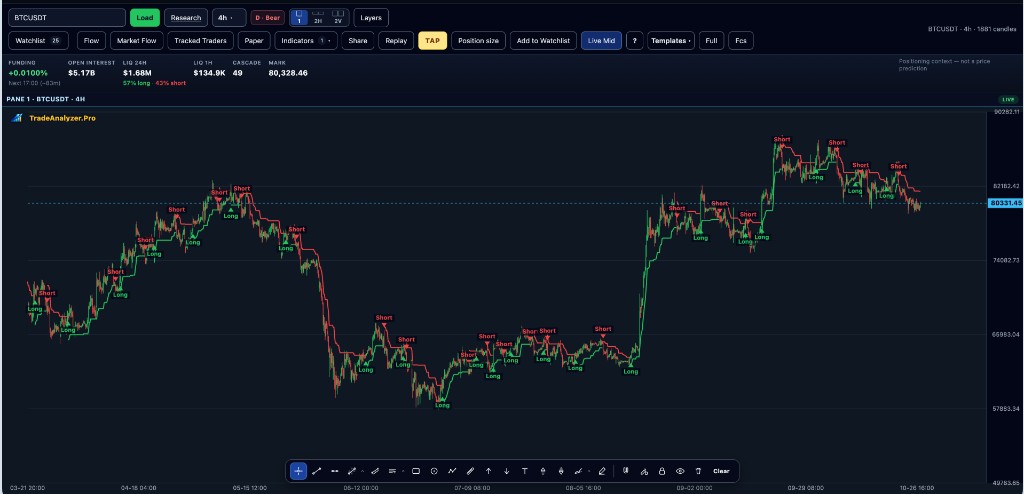
Key points
- Rules run on loaded chart candles only
- Not live order routing and not a full archived backtest claim
- Use templates from the Strategy Library when available
- Always read assumptions, costs and data scope
- Pair TAP with screener shortlists so you are not testing random symbols
Why this matters
No-code rule research closes the gap between “I think RSI < 30 works” and “here is what happened on these candles.” TAP keeps that check inside the same chart workspace.
How to use this in your workflow
1. Open Chart
Load the instrument and timeframe you want to study.
2. Define or pick rules
Build conditions or start from a Strategy Library template.
3. Review metrics carefully
Interpret hit rate, drawdown and trades only within the stated simulation assumptions.
4. Iterate
Change one variable at a time; re-check on a different window when walk-forward tools are available.
Common pitfalls
- Reading simulation metrics as live account performance
- Forgetting results apply only to loaded candles
- Optimising rules until they only fit noise
Live tools on TradeAnalyzer.Pro
Related education guides
Frequently asked questions
Does TAP place trades?
No. TAP is research on loaded candles. TradeAnalyzer.Pro does not execute live orders from TAP.
Is it a guaranteed backtest?
No. Results apply to the loaded data scope and model assumptions — not a claim of live account performance.
Where do I open TAP?
Inside Chart / App on TradeAnalyzer.Pro — start from the education CTA on this page.
Continue on the live platform
Apply what you learned with screeners, charts, TAP and multi-asset research on TradeAnalyzer.Pro.
Open Live Platform →