Chart Strategy Library — 57 TAP Research Presets
Load ready-made rule templates in Chart, review on loaded candles, refine with TAP
TradeAnalyzer.Pro ships 57 Strategy Library presets inside Chart. Each preset encodes closed-bar entry logic, risk defaults and market-scope hints across trend, momentum, breakout, mean reversion, multi-timeframe, VWAP and flow-confirmed ideas. Open Chart → TAP / Strategy Library, load a preset, review markers on candles currently loaded, then save, share or fork. Educational research only — not trade execution, not live signals, not a complete archived multi-year backtest.
Open Live Tool →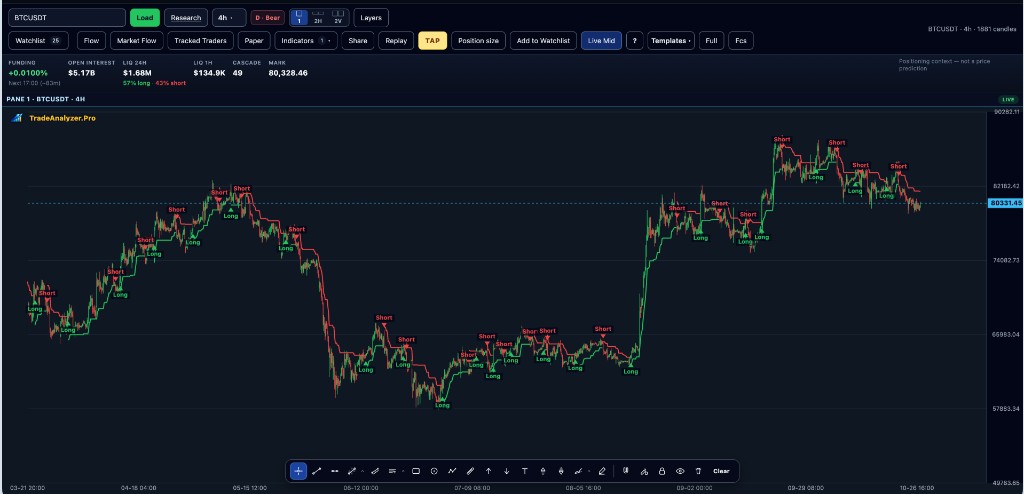
Key points
- 57 built-in TAP research presets in the Chart Strategy Library
- Categories include trend, momentum, breakout, mean reversion, multi-timeframe, VWAP and flow-confirmed ideas
- Presets run on candles currently loaded in Chart — TAP Review scope, not deep archive backtesting
- Pair presets with Strategy Library Scanner shortlists, then confirm structure on Chart
- Risk tools: multi-target TP, trailing stops, break-even, train/test holdout and walk-forward on loaded data
Why this matters
Building every rule from scratch slows research. The Strategy Library gives comparable starting templates so you can test hypotheses faster, then customize parameters. TAP Review metrics (hit rate, drawdown, MFE/MAE) describe only the loaded candle window — Advanced Historical Backtesting across deep archives is still in development.
How to use this in your workflow
1. Open Chart and TAP
Load a symbol and timeframe, then open TAP / Strategy Library in Chart.
2. Pick a preset family
Choose trend, momentum, breakout, mean reversion, multi-TF, VWAP or flow-confirmed templates that match your playbook.
3. Review on loaded candles
Enable TAP Review: inspect markers, exits, and metrics for this Chart window only.
4. Scan then refine
Optional: use Strategy Library Scanner for rising-edge shortlists, then return to Chart to confirm structure and risk.
Common pitfalls
- Treating library presets or scanner rows as automatic buy/sell signals
- Reading TAP Review metrics as guaranteed live account performance
- Ignoring higher-timeframe bias before applying a short-TF preset
Live tools on TradeAnalyzer.Pro
Related education guides
Frequently asked questions
What is the Chart Strategy Library?
A set of 57 built-in TAP research presets. Load them in Chart, review with TAP Review on loaded candles, then save, share or fork. Research templates — not automatic trade signals.
Is this a full historical backtest?
No. TAP Review evaluates rules on candles currently loaded in Chart. Advanced Historical Backtesting across deep archives is in development.
Does TAP execute live orders?
No. TradeAnalyzer.Pro is research only — TAP, library presets and scanners do not route or execute live orders.
Continue on the live platform
Apply what you learned with screeners, charts, TAP and multi-asset research on TradeAnalyzer.Pro.
Open Live Platform →